

Introduction to FPS
- In addition to the traditional way of using a bank account number, customers may make fund transfers through a registered Proxy ID (i.e. email address/ mobile phone number/ Faster Payment System (FPS) identifier (i.e. FPS ID)) or a QR code to pay or receive funds via FPS between local banks.
- Customers may also receive funds from organizations, corporations and the HKSAR Government with the Hong Kong Identity Card number.
“Faster Payment Service” (“FPS”) is a real-time online transfer and payment service platform
- With FPS, customers may make the following 3 types of scheduled, recurring, and instant fund transfers anytime. Under normal circumstances, funds can be credited immediately.
- Transfer between your NCB accounts
- Transfer to third parties / other local banks – registered payees
- Transfer to third parties / other local banks – unregistered payees
7x24 Instant Transfers
- * There is no charge from us if you pay money to, or receive money from accounts from other banks via FPS or RTGS, but other banks may have different charging policies.
No charges for fund transfers in HKD or RMB*
How to register and use FPS?
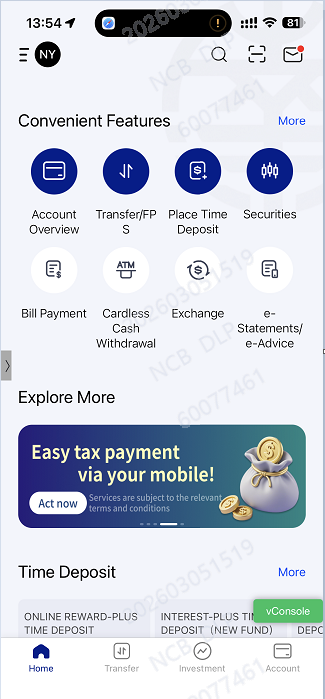
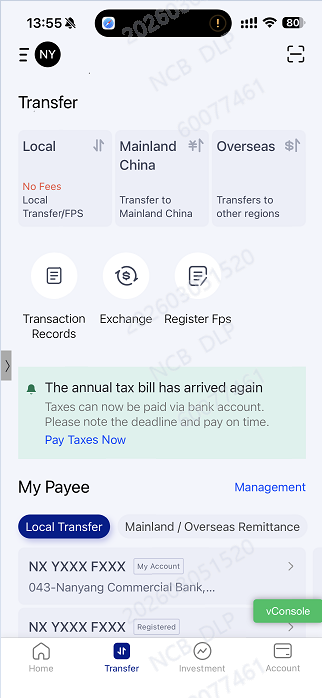
- Step 1: After logging on to the Mobile Banking, click “Transfer”
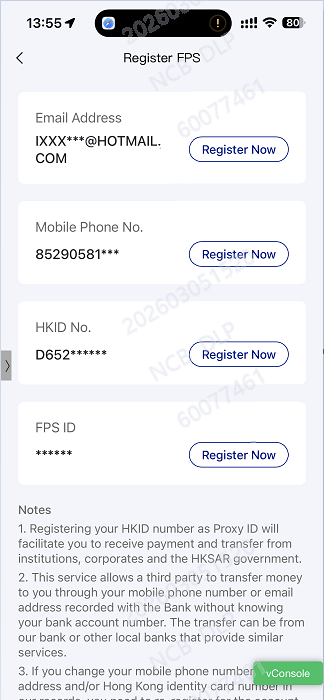
- Step 2: Click “Register FPS”
- Step 3: Select either Mobile Phone no., Email Address, HKID No. , FPS ID or all four and register as your Proxy ID
- Step 4: Select HKD and RMB accounts you want to bind and click “Next”
- Step 5: After verifying your instruction details and accepting relevant terms and condition, a one-time-password will be sent to you via SMS/ Email. By entering the one-time-password for verification, the registration is then complete.
Register “FPS” via Internet Banking or NCB Mobile Banking App
Via Mobile Banking App:
- Step 1: After logging on to the Internet Banking, select “Transfer/Payment” -“Transfer/Payment Settings” - “FPS Setting”
- Step 2: Select either Mobile Phone no., Email Address, HKID No. or all three and register as your Proxy ID
- Step 3: Select HKD and RMB accounts you want to bind and click “Next”
- Step 4: After verifying your instruction details and accepting relevant terms and condition, a one-time-password will be sent to you via SMS/ Email. By entering the one-time-password for verification, the registration is then complete.
Via Internet Banking:
How to register and use FPS?
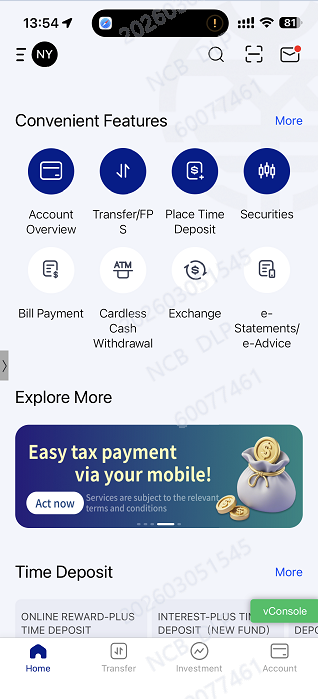
- Step 1: After logging on to the Mobile Banking , click “Convenient Features – Transfer/FPS” or “Home - Transfer”
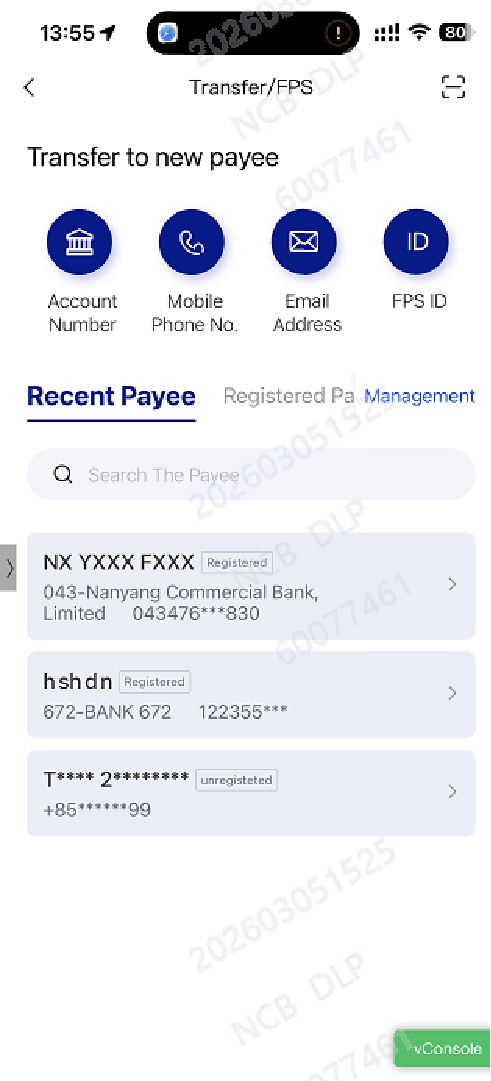
- Step 2: Select a payee from the payee list, or press “Transfer to new Payees - Select either Account Number, Mobile Phone no., Email Address, FPS ID ” and enter the payee’s information
- Step 3: Enter transaction amount and click “Next”
- Step 4: After verifying your instruction details and entering transaction confirmation code, click “Confirm” to complete the transaction. (If you make a payment to registered payee, two-factor authentication is not required).
Transfer or Receive funds via FPS using Internet Banking/Mobile Banking
(1)Payment via Proxy ID
Via Mobile Banking App:
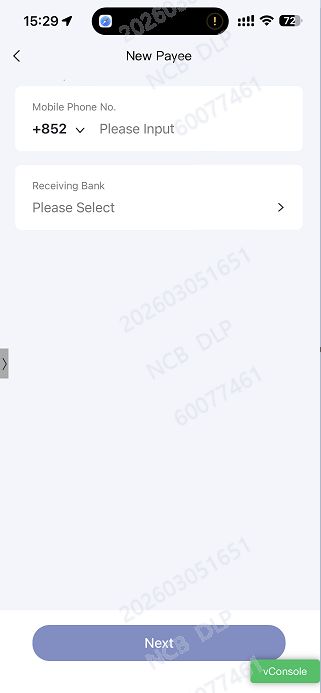
- Step 1: After logging on to the Internet Banking , click the menu “Transfer/Payment” – “Transfer to Local Bank”- “Transfer/FPS”
- Step 2: After selecting the debit account, select a registered payee, or click“Unregistered Payees” and enter the payee’s information
- Step 3: After entering the transaction amount, click “Next”
- Step 4: After verifying your instruction details and entering transaction confirmation code, click “Confirm” to complete the transaction. (If you make a payment to registered payee, two-factor authentication is not required).
Via Internet Banking:
How to register and use FPS?
- Step 1: After logging on to the Mobile Banking , click “Convenient Features – Transfer/FPS” or “Home - Transfer.”
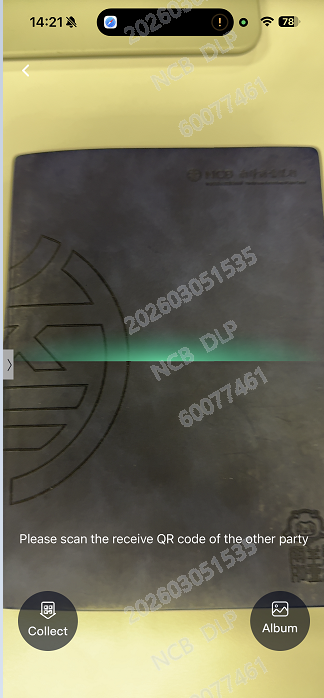
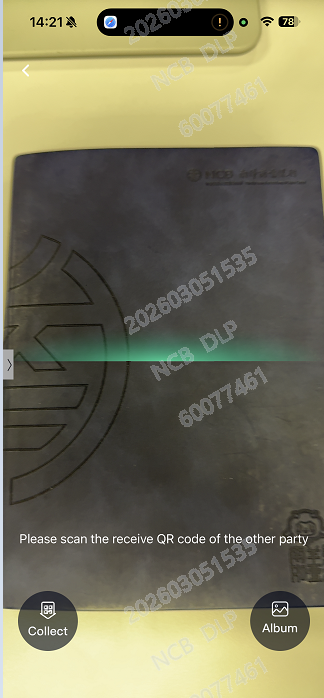
- Step 2: Click the “Scan QR Code Button” at the upper right corner, scan the QR code provided by payee (You may click ”Album” at the bottom to open the QR code image saved in your mobile device)
- Step 3: By selecting the debit account and entering the payment amount, the transaction is then complete
(2) Payment via QR Code
Via Mobile Banking App:
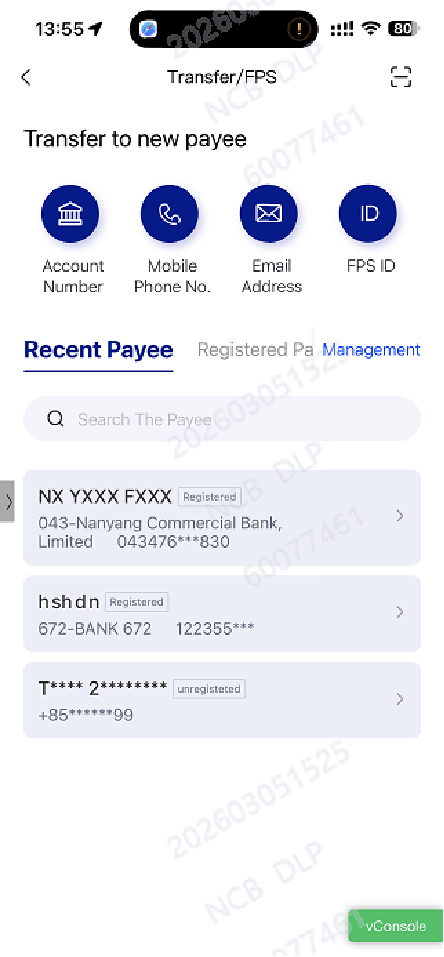
- Step 1: After logging on to the Mobile Banking , click “Convenient Features – Transfer/FPS” or “Home - Transfer.”
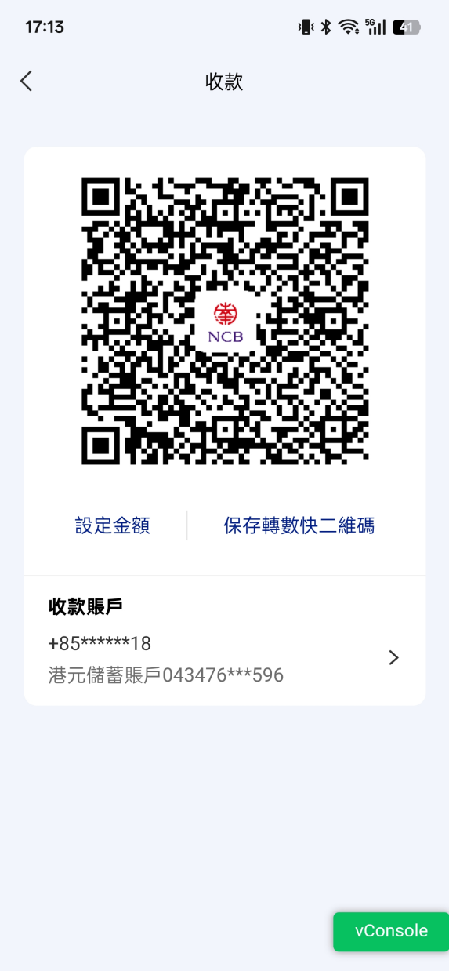
- Step 2: Click the “Scan QR Code Button” at the upper right corner and select “Collect” at the bottom
- Step 3: By following the on-screen instruction, a QR code is generated automatically.You can show or send the code to payer to receive funds.
(3)Receive funds via QR code
Via Mobile Banking App:
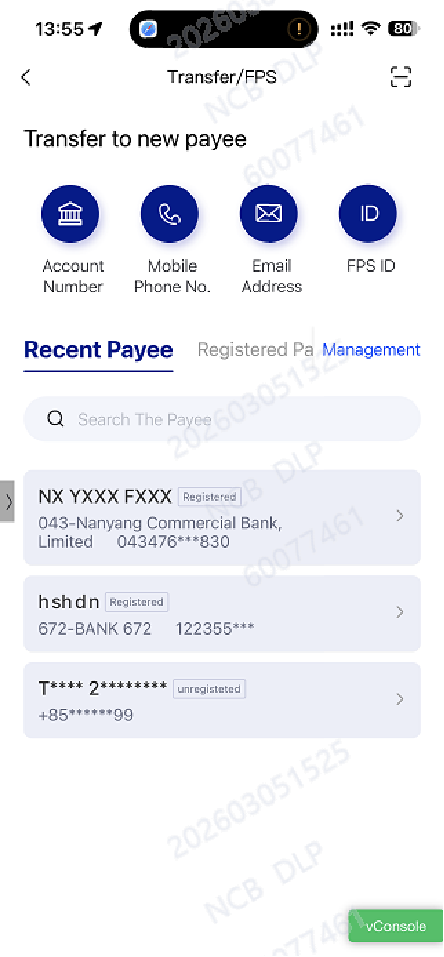
How to register and use FPS?
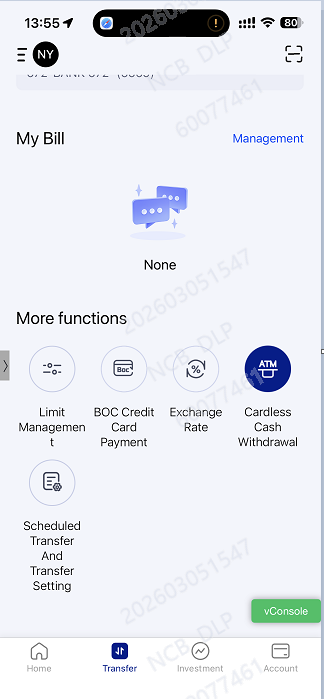
- Step 1: After logging on to the Mobile Banking , click “Home - Transfer.”
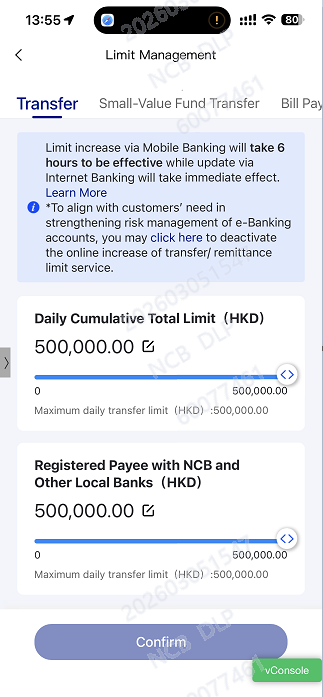
- Step 2: Click “More Functions” -“Limit Management”, then select the limit you want to adjust. After entering the transfer limit, press “Confirm Limit Modification.”
- Step 3: By following the on-screen instruction to complete authentication, the limit update is then complete. (If you want to lower the transfer limit, two-factor authentication is not required)
- You are reminded that it takes 6 hours for limit increase instruction via Mobile Banking to be effective while limit decrease is immediately effective.
Set transfer limits via Internet banking/ Mobile banking
Via Mobile Banking App:
- Step 1: After logging on to the Internet Banking , select “Transfer/Payment” -“Transfer/Payment Settings” - “Transaction Limits”.
- Step 2: Enter the transfer limit you want to set or adjust under “Set New Daily Transfer/Remittance Limit (HKD)”, then click “Next”.
- Step 3: By following the on-screen instruction to complete authentication, the limit update is then immediately effective. (If you want to lower the transfer limit, two-factor authentication is not required)
Via Internet Banking:
For more information on FPS, check out here
Note
- When making fund transfers, customers must ensure that recipient information (such as the receiving account or identification details) is complete and accurate. Failure to do so may result in delays, non-processing of the transfer, or the funds being transferred to a third party's account.. In the event you receive funds that are mis-transferred to you, you should return the funds through the Bank or else you may be criminally liable.
- If you make a scheduled / recurrent transfer instruction, please ensure that there is sufficient balance in the debit account and sufficient transfer limit on the day the instruction is executed. Otherwise, the instruction will be rejected.
- .The Message to Recipient you provide will be submitted to the recipient bank but it is subject to the recipient bank’s decision on whether and how to deliver such information to the receiver. Please check with the recipient bank for more details.
- To further enhance the security of FPS transactions, relevant transactions are subject to the followings:
- Daily Cumulative Total Limit: A total aggregate limit shared among all accounts under the same customer. The limit includes “Registered Payee with NCB and Other Local Banks”, “Unregistered Payee with NCB and Other Local Banks”, “Registered Overseas Payee”, “Unregistered Overseas Payee” and “Small-Value Fund Transfer”. Customer may adjust the limit via Internet Banking/ Mobile Banking which is capped at HKD 500,000 or equivalent. Customer may also visit any of our branches for limit adjustment which the limit is capped at HKD 1,000,000 or equivalent.
- Registered Payee with NCB and Other Local Banks: Customer may adjust the limit via Internet Banking/ Mobile Banking which is capped at HKD 500,000 or equivalent. Customer may also visit any of our branches for limit adjustment which the limit is capped at HKD 1,000,000 or equivalent.
- Unregistered Payee with NCB and Other Local Banks: Customer may adjust the limit via Internet Banking/ Mobile Banking which is capped at HKD 100,000 or equivalent.
- Small-Value Fund Transfer: Customer may adjust the limit via Internet Banking/ Mobile Banking which is capped at HKD 10,000 or equivalent.
- Registered Overseas Payee:Customer may adjust the limit via Internet Banking/ Mobile Banking which is capped at HKD 500,000 or equivalent. Customer may also visit any of our branches for limit adjustment which the limit is capped at HKD 1,000,000 or equivalent.
- Unregistered Overseas Payee:Customer may adjust the limit via Internet Banking/ Mobile Banking which is capped at HKD 50,000 or equivalent.
- There is no limit restriction for fund transfer between your NCB accounts;
- There is no cut-off time for FPS if the recipient bank also supports fund transfer through FPS in real-time. If the recipient bank does not support it, the estimated value day will be no later than the next business day.
- FPS supports fund transfers in same currency only.
- The service charge (if applicable) will be debited from the debit account; and additional service charges may also be collected on the beneficiary account and deducted from the transfer amount by the recipient bank. Please check with the recipient bank for more details.
- The Bank will continue to provide services as usual on the severe weather. To avoid any doubt, for the purposes of this tips, “Severe Weather” refers to the Hong Kong Observatory issuing a Typhoon Signal No. 8 or above, a Black Rainstorm Warning, or the Hong Kong SAR Government declaring an “Extreme Condition”.
- Customers must activate Small-Value Fund Transfer service prior to using QR code to pay or receive funds. For more information on limit update, please click here.
- For enquiries, please contact our Customer Service Hotline at (852) 2616 6628.